
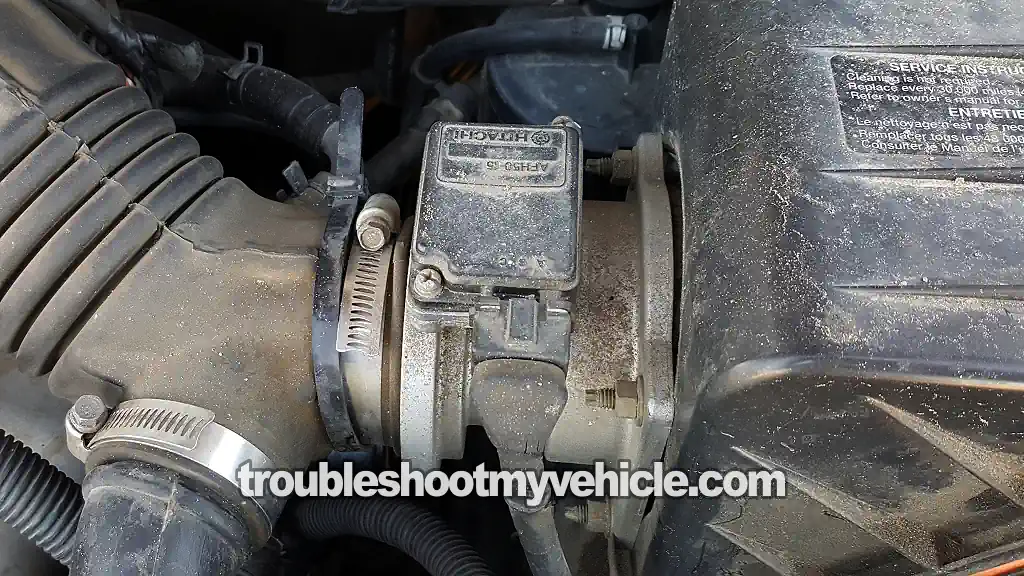
The mass airflow (MAF) sensor on the 1993-1995 3.0L V6 Nissan Quest or Mercury Villager minivan can be tested with three easy tests, and you don't need an automotive scan tool.
These three tests involve making sure the MAF sensor is producing an usable MAF signal the PCM can work with and that it's getting both power and Ground.
In this tutorial, I'll show you how to do all three tests with a simple multimeter. Yep, you won't need any fancy or expensive diagnostic equipment to check the MAF sensor.
With your test results, you'll quickly and easily find out if the MAF sensor is bad and wreaking havoc on your minivan's engine performance, or if the problem is something else.
Contents of this tutorial:
- Symptoms Of A Bad Nissan Quest MAF Sensor.
- What Tools Do I Need?
- Circuit Descriptions Of The Quest MAF Sensor Connector.
- How Does The Nissan Quest MAF Sensor Work?
- TEST 1: Testing The MAF Signal.
- TEST 2: Making Sure The MAF Sensor Has Power.
- TEST 3: Making Sure The MAF Sensor Has Ground.
- More 3.0L V6 Nissan Quest Diagnostic Test Tutorials.
 You can find this tutorial in Spanish here: Prueba: Sensor de Flujo de Aire (MAF) 3.0L Nissan Quest (1993, 1994, 1995) (at: autotecnico-online.com).
APPLIES TO: This tutorial applies to the following vehicles:
- 3.0L V6 Nissan Quest: 1993, 1994, 1995.
- 3.0L V6 Mercury Villager: 1993, 1994, 1995.
MAF SENSOR CIRCUIT DIAGRAM:
1996-1998 MAF SENSOR DIAGNOSTIC TESTS:
Symptoms Of A Bad Nissan Quest MAF Sensor
The fuel injection computer —the powertrain control module (PCM)— on your Nissan Quest or Mercury Villager needs to know how much air is entering the engine as the throttle opens and closes. The component tasked with this is the MAF sensor.
When the MAF sensor fails on your minivan, it's going to wreak havoc on engine performance, and you're going to see one or more of the following symptoms:
- MAF Codes that light up the check engine light (CEL) on your instrument cluster.
- OBD I Code 12: Mass Air Flow Sensor Circuit.
- OBD II code P0100: Mass Air Flow Sensor Circuit.
- MAF sensor malfunction that DOES NOT light up the check engine light (CEL).
- Lean and/or Rich code(s).
- OBD II code P0171.
- OBD II code P0172.
- A tremendous lack of power upon acceleration.
- Black smoke coming from the tail-pipe.
- Bad gas mileage.
- Vehicle may idle rough and stall.
Circuit Descriptions Of The Quest MAF Sensor Connector
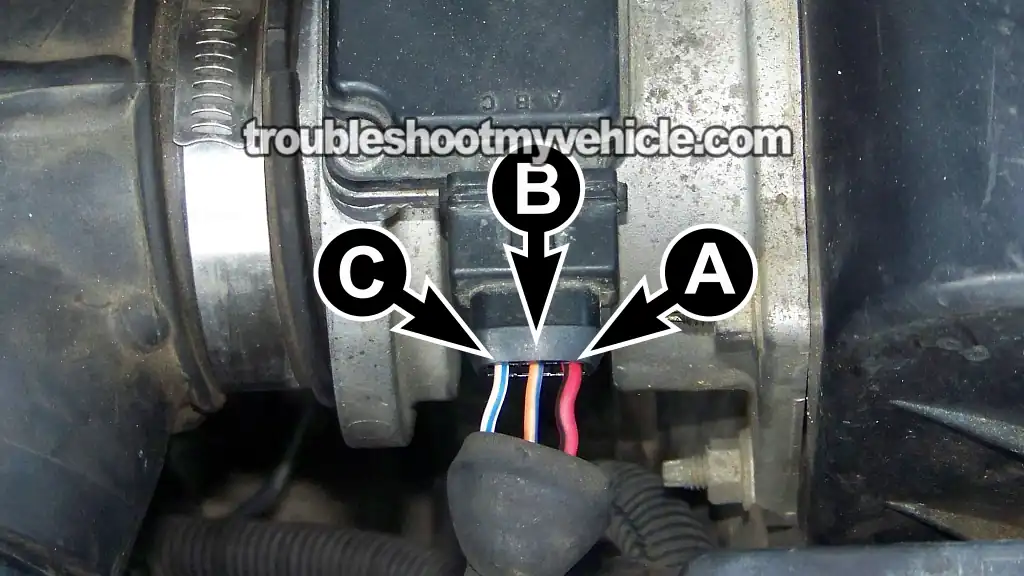
Your Nissan Quest or Mercury Villager's MAF sensor is a 3-wire sensor. One wire delivers 12 Volts, another supplies Ground, and the last one carries the MAF signal to the PCM.
I've labeled each of the wires with the letters A through C, and below, you'll find a brief description of what each circuit does —info we'll need in the following test sections.
| Terminal | Wire | Description |
|---|---|---|
| A | Red with black stripe (RED/BLK) | Power —12 Volts |
| B | Orange with blue stripe (ORG/BLU) | MAF Signal Ground |
| C | White with blue stripe (WHT/BLU) | MAF Signal |
MAF SENSOR CIRCUIT DIAGRAM: MAF Sensor Circuit Wiring Diagram (1993-1995 3.0L V6 Nissan Quest).
How Does The Nissan Quest MAF Sensor Work?
The mass air flow (MAF) sensor's role in the fuel injection system of your Nissan Quest (Mercury Villager), is to measure the amount of air that the engine is breathing and to turn this measurement into a DC voltage signal.
This MAF sensor signal is then sent to the fuel injection computer, which uses it to efficiently run the mini-van, whether it's just idling at a traffic-light or cruising down the road.
To be a little more specific:
- At higher RPM when the engine breathes in more air, the MAF sensor produces a higher voltage signal output.
- At lower RPM when the engine breathes in less air, the MAF sensor produces a lower voltage signal output.
So if the Quest or Villager's 3.0L V6 engine is revved up to 2,500 RPMs, the MAF sensor produces and sends a higher DC voltage signal to the computer than at idle RPM. Once the engine returns to idle RPM, the voltage signal (produced at 2,500 RPM) goes back to a lower voltage value, which the computer also receives.
When testing this DC voltage MAF signal with your multimeter, the important thing to know is not an actual Volts DC value at a specific RPM, but to confirm that the MAF voltage signal increases/decreases as engine RPM increases/decreases.
If the MAF sensor has failed, you'll see that its voltage signal output will stay stuck in one value regardless of engine RPM.
TEST 1: Testing The MAF Signal
The first thing we're going to do is tap into the white with blue stripe (WHT/BLU) wire of the MAF sensor's 3-wire connector with our multimeter (it's the one I've labeled with the letter C in the photo above).
Then we're going to crank the engine and see if:
- The MAF signal voltage output increases as we rev the engine up.
- When you let off the throttle, we need to see that the signal voltage decreases.
If the MAF sensor is toast, the MAF signal will either be missing or stuck at one value, no matter how much you rev the engine.
I do want to point out that the MAF sensor must remain connected to its 3-wire connector during this test. To access the signal in the wire, you'll need to either back-probe the connector or use a wire-piercing probe on the wire itself.
The tool I use is a wire-piercing probe. If you don't have one and need to buy one, this is the one I recommend: Goupchn 4mm Banana to Banana Plug Test Leads Kit (Amazon affiliate link).
NOTE: Don't have a multimeter, or need to upgrade the one you've got? This is the one I use and recommend: Tekpower TP8268 AC/DC Auto/Manual Range Digital Multimeter (Amazon affiliate link).
OK, this is what you'll do:
- 1
Place your multimeter in Volts DC mode.
- 2
Ground the black lead at the battery negative (-) terminal.
- 3
Connect the red multimeter test lead to the WHT/BLU wire.
NOTE: The MAF sensor must remain connected to its 3-wire connector. You'll need to either back-probe the connector or use a wire-piercing probe on the white/blue wire itself to access the signal in the wire. - 4
Crank and start the engine.
- 5
Note the Volts DC reading on your multimeter as the engine idles. At idle and with a fully warmed up engine, you should see 1 to 1.7 Volts DC on your multimeter.
This reading may fluctuate a bit, but no matter what the instability in the reading, this will be your base voltage reading. - 6
Manually accelerate the engine. The voltage reading on your multimeter should increase.
At around 2500 RPMs you should see about 1.9 to 2.3 Volts DC on the multimeter. - 7
Let the engine return to idle. The voltage value on the multimeter should return to the base voltage value you recorded in step 5.
This voltage reading may not be the exact same but should be very close. - 8
Repeat this as often as you need to verify that the voltage value increases/decreases when you accelerate/decelerate the engine.
Let's take a look at what your test results mean:
CASE 1: The voltage reading increased and decreased as you revved the engine up and down. This test result tells you that your Quest or Villager's MAF sensor is working correctly.
CASE 2: The voltage reading is missing or stuck as you revved the engine up and down. This test result usually tells you that the MAF sensor is toast and needs to be replaced.
But before we do that (replace the MAF sensor), we've got to make sure that it's getting power and Ground. For your next test, head over to: TEST 2: Making Sure The MAF Sensor Has Power.
TEST 2: Making Sure The MAF Sensor Has Power
Your 3.0L V6 Nissan Quest or Mercury Villager's MAF sensor needs 10 to 12 Volts to function and produce an usable MAF signal.
Since TEST 1 has confirmed the MAF signal is either missing or stuck at one value, regardless of engine RPM, in this test section, we're going to make sure the red with black stripe (RED/BLK) wire is delivering 10 to 12 Volts with the key in the ON position and the engine OFF.
In the photo above, I've labeled the RED/BLK wire with the letter A. To see if it's delivering 10 to 12 Volts —we're going to unplug the connector and probe its female terminal with our multimeter.
If the RED/BLK wire is delivering power to the MAF sensor, our next diagnostic step is to make sure it's also getting Ground.
OK, let's start:
- 1
Disconnect the MAF sensor from its 3-wire connector.
- 2
Place your multimeter in Volts DC mode.
- 3
Connect the black multimeter test lead to the battery negative (-) terminal.
- 4
Probe the front of the female terminal (of the connector) that connects to the RED/BLK wire with the red multimeter test lead.
- 5
Turn the key to the ON position but don't crank or start the engine.
- 6
If all is good, then your multimeter should display 10 to 12 Volts DC.
Let's take a look at what your test results mean:
CASE 1: The RED/BLK wire is delivering 10 to 12 Volts. This test result confirms your Quest or Villager's MAF sensor is getting the power it needs to create a MAF signal the PCM can use.
Now that we've confirmed the MAF sensor is getting power, our next step is to make sure it's also getting Ground. For this test, go to: TEST 3: Making Sure The MAF Sensor Has Ground.
CASE 2: The RED/BLK wire IS NOT delivering 10 to 12 volts. Double-check that you're testing the correct terminal and that it actually connects to the RED/BLK wire, then repeat the test.
If you still don't see the indicated voltage, this result tells you the MAF sensor itself isn't the cause of the MAF sensor trouble code and the related engine performance issues, since without power the MAF sensor can't produce a signal.
Your next step is to find out why the MAF sensor isn't getting power and restore it. Once this circuit has power, the MAF sensor will function again, and the MAF sensor trouble code —along with the engine performance issues— will clear.
MAF sensor circuit diagram: MAF Sensor Circuit Wiring Diagram (1993-1995 3.0L V6 Nissan Quest).
TEST 3: Making Sure The MAF Sensor Has Ground
Alright, if you've reached this point, the previous two tests have confirmed the following conditions:
- Your minivan's MAF sensor signal voltage output is either missing or stuck at one value as you rev the engine up and down (TEST 1).
- The RED/BLK wire is delivering power to the sensor (TEST 2).
For our final diagnostic test, we've got to make sure the PCM is supplying the MAF sensor with Ground.
This Ground is supplied to the MAF sensor by the blue with orange stripe (BLU/ORG) wire of the MAF sensor's 3-wire connector. In the photo above, this wire is labeled with the letter B.
Since this is a PCM-supplied Ground —not a chassis Ground— it's only available with the key in either the ON or START position. For our testing purposes, we're going to check this PCM-supplied Ground with the key in the ON position but the engine OFF.
IMPORTANT: Be careful not to connect battery voltage directly to the ORG/BLU wire, or you'll fry the PCM. The multimeter voltage test outlined below is a safe way to check for the presence of this PCM-supplied Ground in the circuit.
Here's the test:
- 1
Disconnect the MAF sensor from its 3-wire connector.
- 2
Place your multimeter in Volts DC mode.
- 3
Connect the red multimeter test lead to the battery positive (+) terminal.
- 4
Probe the front of the female terminal (of the connector) that connects to the ORG/BLU wire with the red multimeter test lead.
- 5
Turn the key to the ON position but don't crank or start the engine.
- 6
If all is good, then your multimeter should display 10 to 12 Volts DC.
Let's take a look at what your test results mean:
CASE 1: The ORG/BLU wire is delivering Ground. This test result confirms your Quest or Villager's MAF sensor is getting the Ground it needs to create a MAF signal the PCM can use.
You can conclude the MAF sensor is fried and needs to be replaced if the following conditions are true:
- The MAF signal voltage is either missing or stuck at one value, regardless of engine RPM (TEST 1).
- The RED/BLK wire is delivering 10 to 12 Volts to the sensor (TEST 2).
- In this last test section, you've confirmed the ORG/BLU wire is delivering Ground from the PCM.
When it's time to replace the MAF sensor, I want to recommend the following two well-known automotive brands that I've been using my entire automotive repair career.
CASE 2: The ORG/BLU wire IS NOT delivering 10 to 12 volts. Double-check that you're testing the correct terminal and that it actually connects to the ORG/BLU wire, then repeat the test.
If you still don't see the indicated voltage on your multimeter, this rules out the MAF sensor itself as the cause of the MAF sensor trouble code and the related engine performance issues, since without this PCM-supplied Ground the sensor can't produce a MAF signal.
Your next step is to find out why the MAF sensor isn't getting Ground (from the PCM) and solve the issue. Once this circuit begins delivering Ground from the PCM, the MAF sensor will function again, and the MAF sensor trouble code —along with the engine performance issues— will clear.
MAF sensor circuit diagram: MAF Sensor Circuit Wiring Diagram (1993-1995 3.0L V6 Nissan Quest).
More 3.0L V6 Nissan Quest Diagnostic Test Tutorials
You can find a complete list of diagnostic tutorials and wiring diagrams in this index:
Here's a small sample of the tutorials you'll find in the index:
- How To Test The Fuel Pump (1993-1998 3.0L V6 Nissan Quest).
- How To Troubleshoot A Cylinder Misfire (1993-1998 3.0L V6 Nissan Quest).
- How To Test For A Blown Head Gasket (1993-1998 3.0L V6 Nissan Quest).
- How To Test The Fuel Injectors (1993-1995 3.0L V6 Nissan Quest).

If this info saved the day, buy me a beer!
