
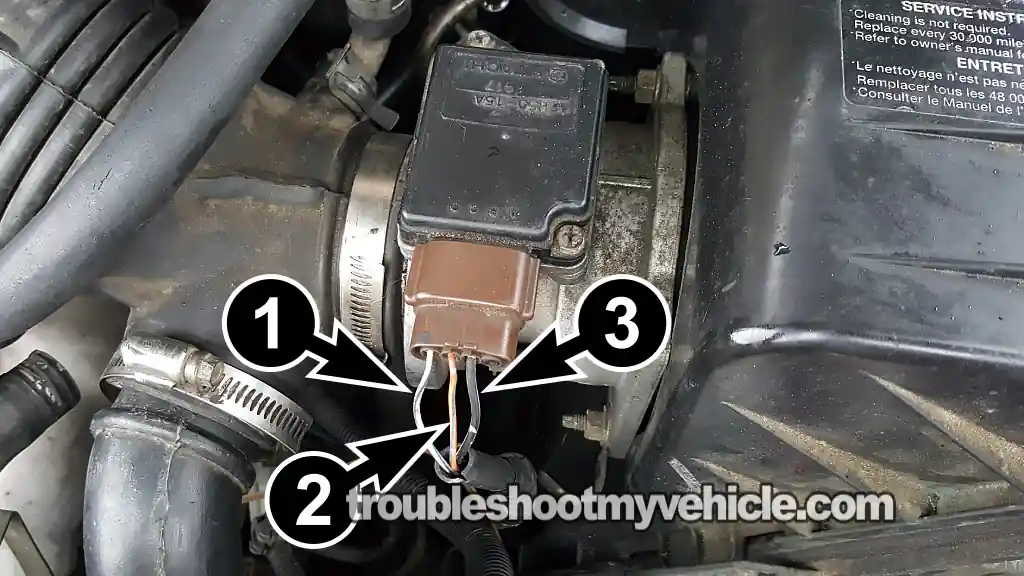
In this tutorial, I'm going to show you how to check the mass airflow (MAF) sensor on the 1996-1998 3.0L V6 Nissan Quest or Mercury Villager.
Specifically, I'm going to show you how to check the MAF signal voltage output, and we're also going to make sure the MAF sensor is getting both power and Ground.
From the results of these three diagnostic tests, all done with a simple multimeter, you'll quickly and easily figure out if the MAF sensor is toast and needs to be replaced, or if the problem is something else.
Contents of this tutorial:
- Symptoms Of A Bad MAF Sensor.
- Circuit Descriptions Of The Quest MAF Sensor Connector.
- Basic MAF Sensor Operating Theory.
- TEST 1: Testing The MAF Signal.
- TEST 2: Making Sure The MAF Sensor Is Getting Power.
- TEST 3: Making Sure The MAF Sensor Is Getting Ground.
- More 3.0L V6 Nissan Quest Diagnostic Test Tutorials.
APPLIES TO: This tutorial applies to the following vehicles:
- 3.0L V6 Nissan Quest: 1996, 1997, 1998.
- 3.0L V6 Mercury Villager: 1996, 1997, 1998.
MAF SENSOR CIRCUIT DIAGRAM:
1993-1995 MAF SENSOR DIAGNOSTIC TESTS:
Symptoms Of A Bad MAF Sensor
As you're probably already aware, the powertrain control module (PCM) in your Nissan Quest or Mercury Villager needs to know how much air is entering the engine.
With this air intake info, the PCM can calculate the correct amount of fuel to inject into the engine. Since the MAF sensor is such a critical part of the engine management system, when this bad boy fails, it's going to wreak havoc on engine performance.
When the MAF sensor fails, you're going to see one or more of the following symptoms:
- MAF diagnostic trouble code (DTC) that lights up the check engine light (CEL) on your instrument cluster:
- P0100: MAF Sensor Circuit.
- Lean and/or rich air/fuel mixture code(s).
- P0171.
- P0172.
- A tremendous lack of power upon acceleration.
- Black smoke coming from the tail-pipe.
- Bad gas mileage.
- Engine may idle rough and stall.
- Hard start —you've got to crank the engine a long time before it starts.
Circuit Descriptions Of The Quest MAF Sensor Connector
The MAF sensor on your Nissan Quest or Mercury Villager has a 3-wire connector, and each of those three circuits has a specific job.
In the table below, you'll find a brief description of each one. This is circuit info we'll need to test the MAF sensor in the tests to follow.
| Terminal | Wire | Description |
|---|---|---|
| 1 | White with blue stripe (WHT/BLU) | MAF Signal |
| 2 | Orange with blue stripe (ORG/BLU) | MAF Signal Ground |
| 3 | Black with white stripe (BLK/WHT) | 12 Volt Input |
Basic MAF Sensor Operating Theory
To successfully diagnose the MAF sensor as good or bad, we need to understand how it works. More specifically, we need to know what its MAF signal voltage output should look like while we're testing it.
So, if the MAF sensor is functioning correctly, you're going to see the following:
- When the engine is idling (low RPM), the MAF sensor signal voltage output is low —around 0.9 to 1 Volts DC.
- As you rev up the engine, like when you step on the gas pedal, the MAF sensor produces a higher voltage signal output.
The key thing to remember during this diagnostic test is that we're not looking for a specific voltage at a specific RPM. What we want to see is the MAF signal voltage increase as you rev the engine and decrease as you let it return to idle.
Nine times out of ten, when the MAF sensor fails, its signal voltage will either stay stuck at one value or show zero Volts, regardless of engine RPM.
Where To Buy The MAF Sensor And Save
If you do find that the mass airflow (MAF) sensor on your 1996-1998 3.0L V6 Nissan Quest or Mercury Villager is bad and needs to be replaced, I want to recommend the following two well-known automotive brands: Walker Products and Delphi.
These are brands I've been using my entire automotive repair career, and I don't hesitate to recommend them:
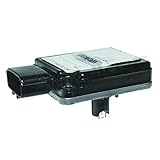
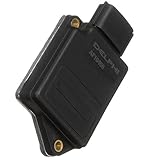
Disclosure: As an Amazon Associate, I earn from qualifying purchases. If my tutorials help you, using these links is an easy way to support the site at no extra cost to you. Thank you!
NOTE: The MAF sensors above fit the 1996-1998 3.0L V6 Nissan Quest and Mercury Villager. Still, once you arrive at the site, they'll ask for your vehicle's specific details to make sure it fits. If it doesn't fit, they'll help you find the correct one.
TEST 1: Testing The MAF Signal
To begin our MAF sensor diagnostic, we're going to tap into the sensor's signal output wire and see what the MAF signal voltage is doing.
Specifically, this is what we want to see:
- At low engine RPM (idle) and the engine at normal operating temp, the MAF signal voltage output should be around 1 to 1.7 Volts DC.
- When we rev the engine up, the MAF signal voltage output should increase. At 2,500 RPM, you should a signal voltage around 1.9 to 2.3 Volts DC.
If the MAF signal voltage output is missing or stuck at one value, regardless of engine RPM, then we can conclude the MAF sensor is malfunctioning. At that point, our next step is to make sure it's getting power and Ground.
Before we begin, I do want to point out that we're going to tap into the MAF signal output wire, which is the white with blue stripe (WHT/BLU) wire of the MAF sensor's 3-wire connector. The connector must remain connected to the MAF sensor during this test.
You can either back-probe the connector or use a wire-piercing probe on the white/blue wire itself. My go-to tool for this is a wire-piercing probe. If you don't have one and need to buy one, you can get one here: Goupchn 4mm Banana to Banana Plug Test Leads Kit (Amazon affiliate link).
OK, this is what we need to do:
- 1
Place your multimeter in Volts DC mode.
- 2
Connect the black multimeter test lead at the battery negative (-) terminal.
- 3
Connect the red multimeter test lead to the WHT/BLU wire of the MAF sensor connector.
NOTE: The MAF sensor must remain connected to its 3-wire connector. Use a back probe on the connector or a wire-piercing probe on the WHT/BLU wire to access the signal voltage. - 4
Crank and start the engine.
- 5
Note the Volts DC reading on your multimeter as the engine idles. At idle and with a fully warmed up engine, you should see around 1 to 1.7 Volts DC on your multimeter.
This reading may fluctuate a bit, but no matter what the instability in the reading, this will be your base voltage reading. - 6
Manually accelerate the engine. The voltage reading on your multimeter should increase.
At around 2500 RPMs you should see about 1.9 to 2.3 Volts DC on the multimeter. - 7
Let the engine return to idle. The voltage value on the multimeter should return to the base voltage value you recorded in step 5.
This voltage reading may not be the exact same but should be very close. - 8
Repeat this as often as you need to verify that the voltage value increases/decreases when you accelerate/decelerate the engine.
Let's take a look at what your test results mean:
CASE 1: The MAF signal voltage increased and decreased as you revved the engine up and down. This test result tells you the MAF sensor is functioning correctly.
CASE 2: The MAF signal voltage is missing or stuck at one value as you revved the engine up and down. This test result generally tells you the MAF sensor is toast and needs to be replaced.
To be sure the sensor has actually failed, we still need to make sure it's getting both power and Ground. For the first of these two tests, head over to: TEST 2: Making Sure The MAF Sensor Is Getting Power.
TEST 2: Making Sure The MAF Sensor Is Getting Power
Up to this point in your MAF sensor diagnostic, you've confirmed the MAF signal voltage output is either missing or stuck at one value, no matter how much you rev the engine up or down.
Before we conclude the MAF sensor is toast, we need to make sure it's getting both power and Ground.
In this test section, we're going to check that the black with white stripe (BLK/WHT) wire is delivering 10 to 12 Volts with the key in the ON position but the engine OFF.
If the BLK/WHT wire is delivering the power the MAF sensor needs, then we'll move on to TEST 3 and make sure the orange with blue stripe (ORG/BLU) wire is providing Ground. Let's get going.
OK, let's start:
- 1
Disconnect the MAF sensor from its 3-wire connector.
- 2
Turn the key to the ON position but don't crank or start the engine.
- 3
Place your multimeter in Volts DC mode.
- 4
Connect the black multimeter test lead to the battery negative (-) terminal.
- 5
Probe the front of the female terminal that connects to the BLK/WHT wire with the red multimeter test lead.
NOTE: In the photo above, the BLK/WHT wire is labeled with number 3. - 6
Your multimeter should display 10 to 12 Volts DC if the BLK/WHT wire is delivering power.
Let's take a look at what your test results mean:
CASE 1: The multimeter reported 10 to 12 Volts present. This is the correct and expected test result and confirms your minivan's MAF sensor is getting the power it needs to produce a MAF signal voltage.
For our next and final test, we need to make sure it's also getting Ground, which is supplied by the PCM. For this test, head over to: TEST 3: Making Sure The MAF Sensor Is Getting Ground.
CASE 2: Your multimeter doesn't report the indicated voltage. Double-check that you're probing the terminal that connects to the BLK/WHT wire, then repeat the test.
If you still don't see 10 to 12 Volts, then we can rule out the MAF sensor itself as the cause of the MAF sensor diagnostic trouble code and the engine performance issues, since without power the MAF sensor can't create a signal the PCM can use.
Your next step is to find out why this voltage is missing from the circuit and restore it. Once the MAF sensor starts receiving power, it'll function again, and the MAF sensor trouble code —along with the engine performance issues— should clear.
MAF sensor circuit diagram: MAF Sensor Circuit Wiring Diagram (1996-1998 3.0L V6 Nissan Quest).
TEST 3: Making Sure The MAF Sensor Is Getting Ground
Up to this point, your previous two tests have confirmed the following conditions:
- The MAF signal voltage output is either stuck or missing, regardless of engine RPM (TEST 1).
- The BLK/WHT wire is delivering 10 to 12 Volts to the MAF sensor (TEST 2).
For our final MAF sensor diagnostic test, we're going to make sure your Nissan Quest or Mercury Villager's PCM is supplying Ground to the MAF sensor.
Yep, this Ground isn't a chassis Ground. It's supplied directly by the PCM and is only available with the key in either the ON or START position. For our test, we're going to check this PCM-supplied Ground with the key in the ON position but the engine off.
To check for the presence of Ground in the orange with blue stripe (ORG/BLU) wire, we're going to do a simple multimeter voltage test.
CAUTION: Be careful when testing the PCM-supplied Ground circuit. Don't connect this wire directly to battery 12 Volts, or you'll fry the PCM. The multimeter voltage test outlined below is a safe way to check for the presence of Ground in the ORG/BLU wire.
OK, these are the test steps:
- 1
Disconnect the MAF sensor from its 3-wire connector.
- 2
Turn the key to the ON position but don't crank or start the engine.
- 3
Place your multimeter in Volts DC mode.
- 4
Connect the red multimeter test lead to the battery positive (+) terminal.
- 5
Probe the front of the female terminal that connects to the ORG/BLU wire with the red multimeter test lead.
NOTE: In the photo above, the ORG/BLU wire is labeled with number 2. - 6
Your multimeter should display 10 to 12 Volts DC if the ORG/BLU wire is delivering Ground from the PCM.
Let's take a look at what your test results mean:
CASE 1: The ORG/BLU wire is delivering Ground from the PCM. This is the correct and expected test result and confirms your minivan's MAF sensor is getting the Ground it needs to produce a MAF signal voltage.
You can conclude the MAF sensor is toast and needs to be replaced if you've confirmed the following conditions:
- TEST 1 —The MAF sensor signal voltage is stuck or missing as you rev the engine up or down.
- TEST 2 —The black/white wire is delivering 10 to 12 Volts.
- In this final test section, you've confirmed the MAF sensor is getting Ground from the PCM.
When it's time to replace the MAF sensor, I want to recommend the following two well-known automotive brands (Walker Products and Delphi). I've used them my entire automotive repair career, and I don't hesitate to recommend them:
- Walker Products 245-2020 Mass Air Flow Sensor Assembly (Amazon affiliate link).
- Delphi AF10459 Mass Air Flow Sensor (Amazon affiliate link).
CASE 2: The ORG/BLU wire IS NOT delivering Ground from the PCM. Double-check that you're probing the terminal that connects to the ORG/BLU wire, then repeat the test.
If you still don't see 10 to 12 Volts, then we can rule out the MAF sensor itself as the cause of the MAF sensor diagnostic trouble code and the engine performance issues, since without Ground the MAF sensor can't create a signal the PCM can use.
Your next step is to find out why this PCM-supplied Ground is missing from the circuit and restore it. Once the MAF sensor starts receiving Ground, it'll function again, and the MAF sensor trouble code —along with the engine performance issues— should clear.
MAF sensor circuit diagram: MAF Sensor Circuit Wiring Diagram (1996-1998 3.0L V6 Nissan Quest).
More 3.0L V6 Nissan Quest Diagnostic Test Tutorials
You can find a complete list of diagnostic tutorials and wiring diagrams in this index:
Here's a small sample of the tutorials you'll find in the index:
- How To Test The Fuel Pump (1993-1998 3.0L V6 Nissan Quest).
- How To Troubleshoot A Cylinder Misfire (1993-1998 3.0L V6 Nissan Quest).
- How To Test For A Blown Head Gasket (1993-1998 3.0L V6 Nissan Quest).
- How To Test The Fuel Injectors (1993-1995 3.0L V6 Nissan Quest).

If this info saved the day, buy me a beer!
